

 توییت
توییت
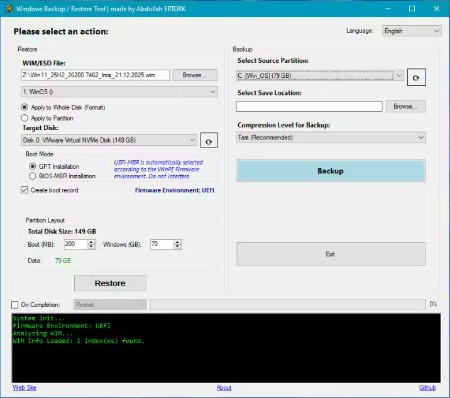
Windows Backup & Restore Tool 2.0.0 | File Size : 0.5 Mb
Windows Backup & Restore Tool is a sophisticated yet user-friendly software solution designed for efficient data backup and restoration.
How Does it Work?
This tool operates seamlessly within both the familiar Windows operating environment and the specialized WinPE (Windows Preinstallation Environment), making it suitable for a variety of scenarios. While its core functionality centers on backup and recovery tasks, it also enables a clean Windows installation when the situation demands. With its intuitive interface and robust features, users can confidently protect their data and ensure a smooth recovery process.
Windows Backup & Restore Tool is a versatile utility that allows you to create comprehensive backups of your entire system or specific partitions and drives. One of its key features is the integration with Volume Shadow Copy Service (VSS), enabling live system backups without downtime.
The Tool Offers Three Levels of Intelligent Compression
None: fastest option
Fast: balanced approach
Maximum: minimizes file size
Restoration Features
Dual Mode Operation
● Whole Disk Restore: Formats entire disk and deploys system
● Partition Only Restore: Restores to the selected partition
Automatic Boot Configuration
● GPT/UEFI support
● MBR/BIOS support
● Automated boot record creation
Multi-Index WIM Support: Select different Windows editions from WIM file
Intelligent Disk Management: Automatic resolution of drive letter conflicts
Additional Features
● Post-Operation Actions: Automatic shutdown or restart after backup/restore
● Real-Time Progress: Detailed logging and progress indicators
● Firmware Detection: Automatic UEFI/BIOS detection
● Safety Checks: Prevents accidental system disk overwrites
● Hidden Partition Support: Temporary drive letter assignment for GUID paths
Additionally, it smartly excludes certain folders, such as cloud storage services like OneDrive, Google Drive, and Dropbox, as well as unnecessary files from the backup process. Furthermore, it supports standard Windows imaging formats, including WIM and ESD, ensuring compatibility and ease of use.
HomePage:
کد:
https://github.com/abdullah-erturk/Windows-Backup-Restore-Tool
-:DOWNLOAD FROM LINKS:-
Download From RapidGatorکد:
https://rapidgator.net/file/37cde73c3906b4b0c90617b918f6c456/
کد:
https://nitroflare.com/view/D667D0FB4666CBD/